Make a quiz from any PDF or textbook chapter
Upload the reading your class is using. Lectern drafts the questions, you check and edit every one, and students see nothing until you decide to release it.
Free starter allowance. No card needed.
The problem
Setting questions takes hours you don't have. You read the chapter again, type every objective and theory question by hand, then do it all over for the next class, the next CA test, the next term. Most quiz tools only save time if you're happy to hand your students questions you haven't checked.
How it works
-
Step 1: Upload your reading
Add a PDF, a Word document or a text file of the chapter you're teaching. On paid plans you can also upload photos of printed or handwritten pages. Lectern works from the material you actually teach.
-
Step 2: Lectern drafts the questions; you make them yours
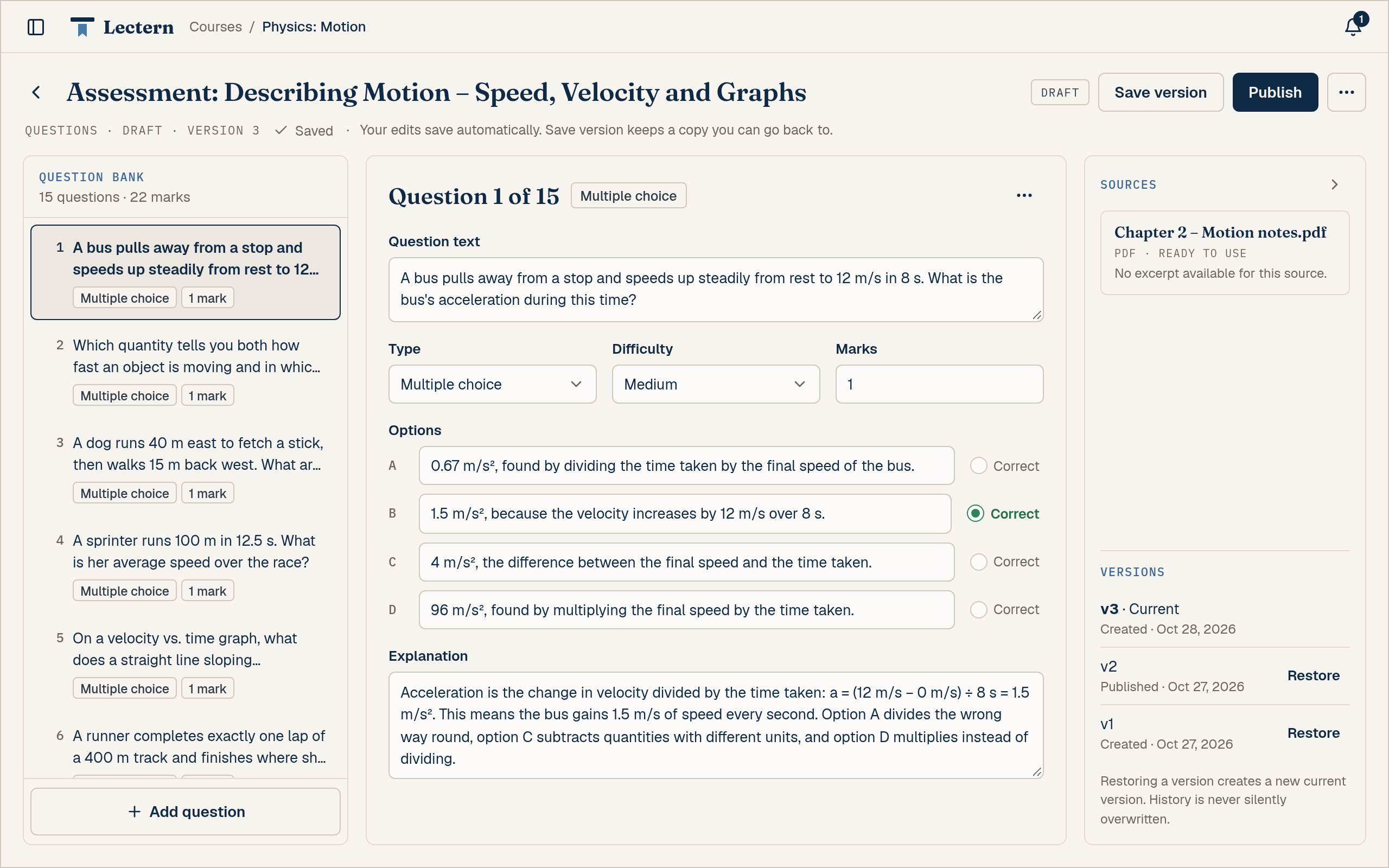
Lectern drafts a set of questions from your reading. Open them in the question bank: edit the wording, remove what you don't want, and add your own. Your work saves as you go, and you can save a version whenever you like. A quiz can't be shared until every question is complete.
-
Step 3: Share the quiz and choose when results go out
On Pro and Team, send your students a link. They don't need an account, and they finish in the same browser they started in. You decide when results are released, and your answer key stays private. On every plan you can download a quiz as a PDF, Word, Markdown or text file: a student copy (questions only) to print for your class, or a teacher copy with the answer key. PDF and Word downloads use a little of your allowance; Markdown and text downloads don't.

You stay in charge
- Every question is yours to approve. Nothing goes to students until you've reviewed it and released it.
- Your answer key stays private. Students never see it.
- You decide on marks. On Pro and Team, any suggested mark waits for your approval before it counts.
- You choose when results are released. Not before you're ready.
- No half-finished quizzes. A quiz can't go out until every question is complete.
Who it's for
-
Secondary school teachers: turn this week's textbook chapter into a class test or CA quiz in less time than it takes to type one.
-
Lecturers: build question sets for a course from the readings you already assign.
-
Tutors: make practice questions from your student's own textbook or notes, page by page.
Frequently asked questions
Yes. Upload the PDF and Lectern drafts questions from it. You review and edit every question in the question bank before anything is shared.
Every plan takes PDF, Word (.doc and .docx) and text (.txt) files. Use a PDF with selectable text. If your reading is a scan, upload photos of the pages instead (JPG, PNG, GIF or WebP, on Starter and above). Each file can be up to 5 MB on Free, 10 MB on Starter and 25 MB on Pro and Team, and Free allows 3 files per course. With a long reading, each quiz draws on a selection of the material rather than every page.
Yes. In the question bank you can change any question, remove the ones you don't want and add your own. Changes save automatically, and you can save a version at any point.
Yes. You can set objective (multiple choice), true/false, short answer and essay questions, and mix them in one quiz.
No. On Pro and Team you share the quiz by link, and students open it without signing up. They finish in the same browser they started in. On every plan you can download a quiz as a PDF, Word, Markdown or text file: a student copy (questions only) to print for your class, or a teacher copy with the answer key. PDF and Word downloads use a little of your allowance; Markdown and text downloads don't.
The Free plan includes a one-time allowance, enough for about three quizzes from your own readings. It doesn't renew. Paid plans renew every month: Starter is ₦2,000 ($5) a month, Pro is ₦10,000 ($10) a month, and Team is ₦15,000 ($15) per teacher a month. Paying yearly costs 10 times the monthly price, so you get two months free.
Your next quiz is already in your textbook.
Upload a chapter, check the questions, and share it when you're ready.